Claude Code is Anthropic's CLI for Claude — an AI agent that lives in your terminal and can read, write, and run code in your project. It's not an autocomplete tool. It's closer to a junior engineer that never gets tired and has read every RFC ever published.
That said, getting good results requires some deliberate habits. Here's what's worked well.
Give it context, not just commands
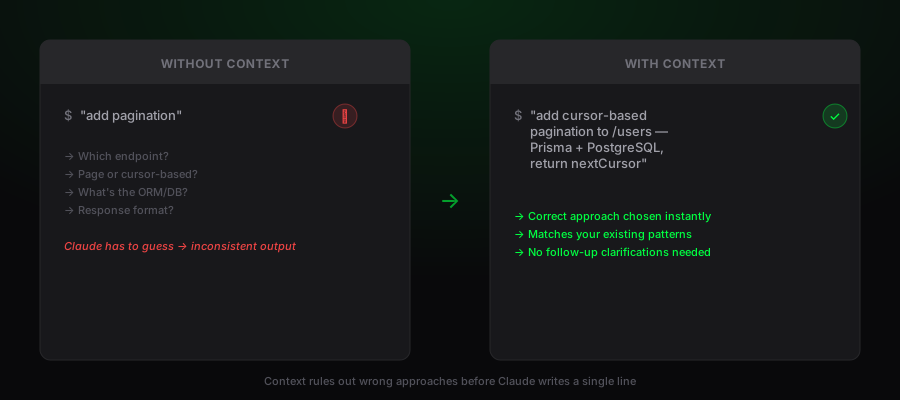
The biggest mistake people make is treating Claude Code like a search engine — asking short, decontextualized questions and expecting great answers. It works much better when you describe the goal, the constraint, and the current state.
Instead of: "add pagination"
Try: "add cursor-based pagination to the /users endpoint — we're using Prisma with PostgreSQL and the response should include a nextCursor field"
The extra context isn't noise. It rules out a dozen wrong approaches before Claude writes a single line.
Use CLAUDE.md to capture project conventions
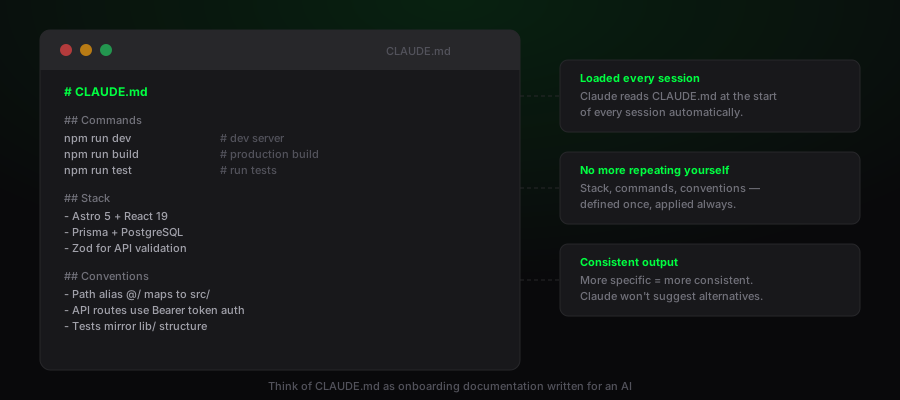
Claude Code automatically reads a CLAUDE.md file at the root of your project at the start of every session. This is where you document the things that would otherwise require repeating every time — your stack, naming conventions, test runner, deploy commands, and any architectural decisions worth preserving.
Think of it as onboarding documentation written for an AI. The more specific it is, the more consistent Claude's output will be. Include things like:
- Which commands to run for dev, build, test, and lint
- Your folder structure and what each layer is responsible for
- Libraries you've already chosen (so it doesn't suggest alternatives)
- Conventions that aren't obvious from the code (e.g. "API routes use Zod for validation")
Let it read before it writes
Claude Code is much more useful when it has read the relevant code before touching anything. For any non-trivial task, it will do this automatically — but you can help by being specific about where to look.
Saying "look at how the existing API routes work before adding the new one" produces far better results than just describing the new endpoint in isolation. It picks up on patterns, error handling conventions, and auth middleware that it would otherwise have to guess at.
Break large tasks into stages
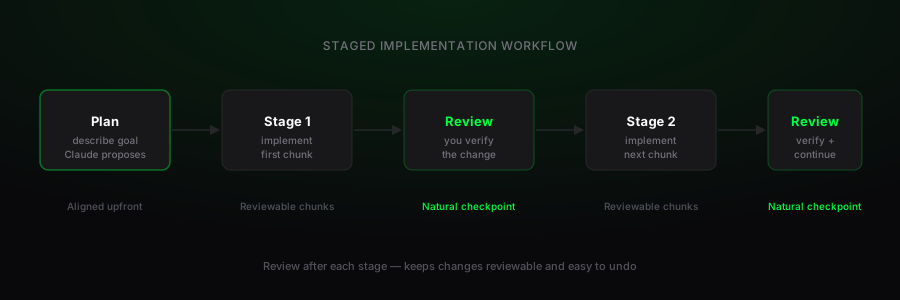
Claude Code handles well-scoped tasks reliably. Multi-hundred-line rewrites across a dozen files are riskier — not because it can't do them, but because longer chains of changes are harder to verify and harder to undo if something goes sideways.
A better approach for large features: describe the overall goal, then let it propose a plan and implement one stage at a time. Review after each stage. This keeps the changes reviewable and gives you natural checkpoints.
Use /plan before complex changes
For anything that touches multiple files or requires architectural decisions, ask Claude Code to plan before it implements. This surfaces the approach for your review, catches misunderstandings early, and prevents spending five minutes generating code you'll immediately ask it to redo.
You can trigger this explicitly by starting your prompt with something like "plan first, then wait for my approval before writing any code."
Verify the output
Claude Code will run your tests and build steps after making changes — but only if you have them. Projects with solid test coverage get dramatically better results because Claude can verify its own work. If a change breaks a test, it catches and fixes it before handing back to you.
If you don't have tests yet, this is a good reason to add them. At minimum, a build step that fails on type errors catches a large class of mistakes.
Keep sessions focused
Like any AI model, Claude Code works best within a focused context. A session that starts with "add a login page," then pivots to "also refactor the data layer," then asks about deployment config will produce increasingly inconsistent results as context grows.
One task per session — or at most a tight cluster of related tasks — keeps the output sharp and the conversation easy to follow.
Treat it like a capable collaborator
The most effective mental model is a capable collaborator who knows the codebase but needs you to make decisions. It won't push back on bad ideas unless you ask. It won't flag a security risk unless it's obviously relevant. It won't refuse to overengineer something just because it's unnecessary.
You're still the engineer. Claude Code moves faster and handles the mechanical parts — the boilerplate, the typing, the plumbing — so you can stay focused on the decisions that actually matter.